If you run an MSP or an IT reseller business, you probably know this Monday-morning feeling. The distributor invoice landed over the weekend, Azure usage came in higher than expected, three customers added seats mid-month, and someone has to turn all of it into invoices that are correct, on time, and profitable.
Doing that by hand once is annoying. Doing it for 200 customers is a full-time job that nobody applied for.
This guide covers how IT resellers handle billing at scale in 2027, what to automate, what to leave alone, and where compliance can catch you off guard. Everything below is aimed at people who run these operations, not people who only read about them.
What is digital services billing management?
Digital services billing management is the process of collecting every charge you owe or earn on cloud, software, and managed services, then turning those charges into accurate customer invoices, payments, and revenue records.
For an IT reseller, that means pulling in distributor invoices, usage data, and subscription changes, matching them to customer contracts, adding your margin and your own services, and billing the customer. It also means reconciling the whole thing afterward so you know what you made.
It sounds like “send an invoice,” but the work is mostly in the data behind the invoice.
Why IT reseller billing is harder than normal billing
A software company bills for one product with one pricing model. A reseller bills for dozens of vendors, each with its own rules. A single customer invoice might include:
- Microsoft 365 seats on a mix of monthly and annual terms
- Azure consumption that changes daily
- Backup priced per terabyte
- Security licenses priced per endpoint
- Your own managed service fees, flat or per user
- One-time hardware or project work
Each vendor bills you differently, on a different calendar, with different credits, proration rules, and true-ups. Your customer sees one invoice and expects it to make sense. That gap between what vendors send you and what customers should see is what makes IT reseller billing its own discipline.
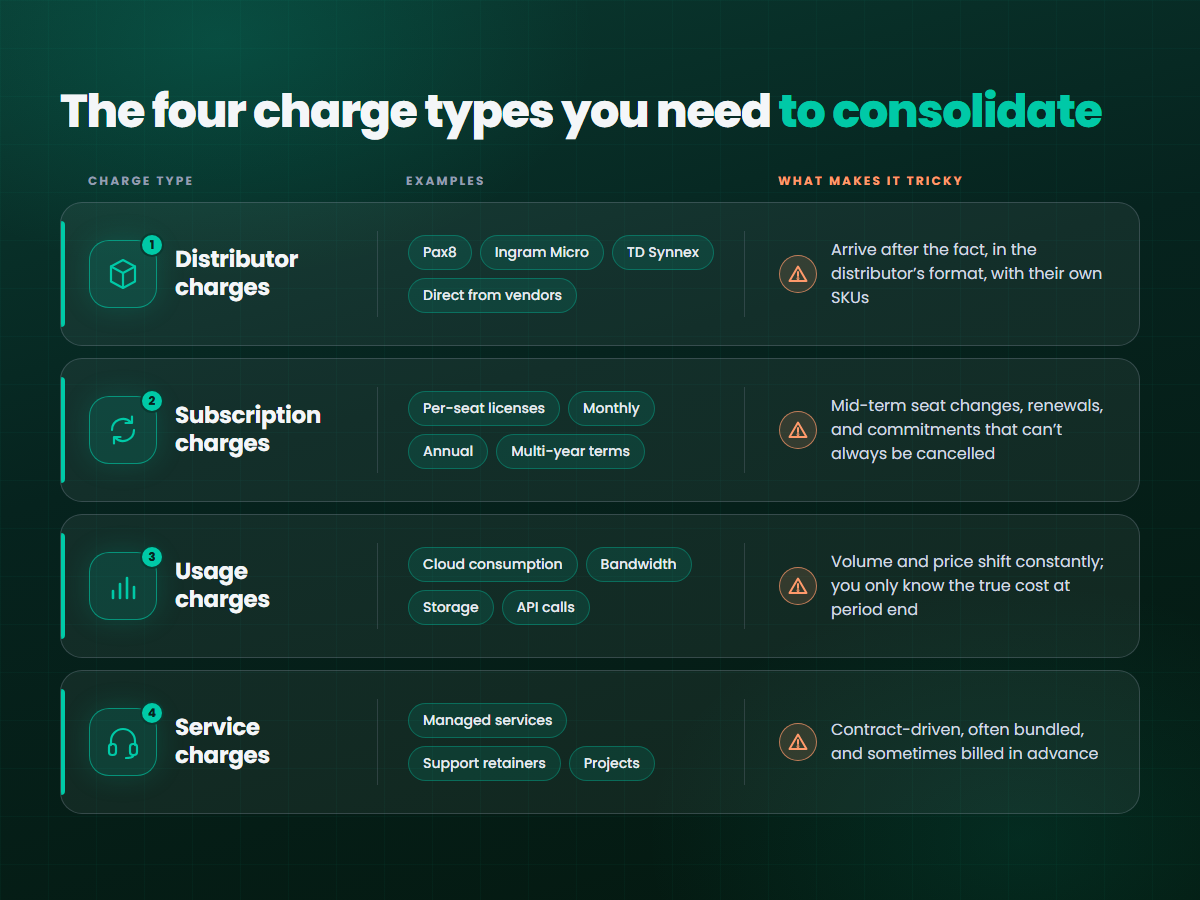
The four charge types you need to consolidate
Almost every reseller billing problem comes down to one of these four. Know them, and the rest gets easier.
How recurring billing really works for resellers
Recurring billing means charging customers automatically on a repeating schedule, usually monthly, for ongoing services. It’s the backbone of an MSP’s revenue, and it’s the part most people assume is simple.
It isn’t, because “recurring” hides several patterns:
- Fixed recurring: same amount every month (a flat managed services fee).
- Quantity-based recurring: amount changes with seat or device count.
- Usage-based recurring: the schedule is fixed, the amount is variable.
- Term-based recurring: the customer pays monthly, but you’re committed to the vendor for a year.
That last one is where margins quietly disappear. If a customer is on a month-to-month contract with you, but you bought an annual license from the vendor, you’re carrying the risk. Good billing operations track both sides of that commitment, not just the customer-facing price.
Multi-service billing: one invoice many sources
Multi-service billing is the practice of combining charges from several products, vendors, and pricing models onto a single customer invoice.
Customers want this. Nobody wants six invoices from the same provider. But building one clean invoice takes a few decisions you should make deliberately:
- Decide your invoice structure. Group by vendor, by service, by location, or by cost center. Pick what your customer’s finance team actually uses.
- Standardize your product catalog. Map each distributor SKU to a name your customer understands. “MSFT-365-BP-NCE-ANN” means nothing to an accounts payable clerk.
- Separate what you resell from what you deliver. Pass-through costs and your own labor should be visible, because they carry different margins and sometimes different tax treatment.
- Keep the detail available. Summaries are good, but customers will ask “why did this go up?” Have the line-item breakdown ready.
Subscription management: the part that never stops
Subscription management is tracking every customer’s active subscriptions, including start dates, renewal dates, quantities, terms, and pricing, and keeping them in sync with what you’ve bought from the vendor.
If your subscription records and your vendor records disagree, you either overbill (a trust problem) or underbill (a margin problem). Both are expensive.
What good looks like:
- A single source of truth for every subscription, per customer
- Automatic sync with distributor and vendor portals, instead of manual re-entry
- Renewal alerts well before the commitment date
- Clear rules for proration when a customer adds or removes seats mid-term
- A record of every change, so disputes can be settled in minutes
Renewals deserve special attention. A subscription that silently auto-renews at a new price, without your customer knowing, will turn into a hard conversation.
Where automated invoicing helps (and where it doesn’t)
Automated invoicing generates and sends customer invoices based on rules and data, without someone assembling them by hand each cycle.
It’s the most obvious win in the whole stack. A reasonable setup can:
- Pull the latest subscription and usage data on a schedule
- Apply your pricing, markup, and discounts automatically
- Generate invoices in your required format
- Send them and track payment status
- Flag exceptions for a human to review
The last point matters most. Automation should handle the 95% that’s routine and surface the 5% that isn’t. An invoice that’s 40% higher than last month, a customer with a negative line item, a vendor charge with no matching subscription: these should stop and ask for a person, not slide through.
Teams that try to automate everything usually end up with fast, confident, wrong invoices. Teams that build in review checkpoints end up with fewer corrections and calmer finance conversations.
A practical billing workflow step by step
Here’s a monthly cycle that works for most resellers. Adjust it to your size.
- Ingest. Import distributor invoices, usage data, and subscription changes.
- Match. Tie every vendor charge to a customer and a contract. Anything unmatched goes to an exceptions list.
- Price. Apply your markup, discounts, bundles, and minimums.
- Review. Check exceptions, large swings, and new customers before anything goes out.
- Invoice. Generate and deliver invoices, including taxes.
- Collect. Run payments, send reminders, and handle failed payments.
- Reconcile. Compare what you billed against what you owe vendors, and look at margin per customer.
- Sync. Push the results into your accounting system.
If step 2 is painful for your team today, that’s your first fix. Matching is where most billing hours go.
Integration: the difference between a tool and a system
A billing tool that doesn’t connect to the rest of your stack just gives you one more place to type things in. The integrations that matter most:
- Distributors and vendors: for subscription, pricing, and invoice data
- PSA and ticketing: so billable work and contracts line up with what’s invoiced
- CRM: so sales commitments become billing records without re-keying
- Accounting and ERP: so invoices, payments, and revenue land in the right ledger
- Payment providers: so customers can pay the way they want
- Usage sources: cloud consoles and monitoring tools that report consumption
When you evaluate any platform for digital services billing management, ask what the integration really does. “Connects to QuickBooks” can mean a live two-way sync or a monthly CSV export. Those are very different experiences.
Compliance: the things that bite later
Billing touches money, tax, and customer data, so it touches regulation. You don’t need to be a lawyer, but you do need to know where the risks are.
Sales tax and VAT. Software and cloud services are taxed differently depending on where the customer is and what they bought. The rules change often and vary by region. Make sure your system calculates tax by jurisdiction, or integrates with a tax engine that does.
Revenue recognition. If you bill annually in advance, you generally can’t count it all as revenue on day one. Standards like ASC 606 and IFRS 15 govern how and when revenue is recognized. Your finance team or accountant should set the policy, and your billing data should support it.
E-invoicing mandates. More countries now require structured electronic invoices submitted through government-approved formats or portals. If you bill across borders, check the requirements for each market you serve.
Payment and data security. If you store or process card data, PCI DSS applies. The simplest path for most resellers is to let a compliant payment provider handle card details so they never touch your systems.
Audit trails. Customers, auditors, and vendors will sometimes ask how a number was calculated. Keep a record of pricing changes, adjustments, credits, and approvals.
Vendor program rules. Distributors and vendors have partner agreements that may dictate how you bill, price, or report. Read them. They matter.
This is general guidance, not legal or tax advice. Check specifics with your accountant or advisor.

The metrics worth watching
Skip the dashboard with 40 widgets. These tell you whether your billing operation is healthy:
- Billing accuracy rate: the share of invoices sent without needing a correction
- Days to invoice: how long after period end invoices go out
- Days sales outstanding (DSO): how long it takes to get paid
- Margin by customer and by vendor: where you actually make money
- Unbilled or unmatched charges: money you’ve spent and not yet recovered
- Renewal exposure: commitments coming due without a customer decision
Unbilled charges deserve extra attention. Many resellers find, the first time they look properly, that they’ve been absorbing costs they should have passed on.
Common mistakes to avoid
- Billing from spreadsheets for too long. They work until the month you’re sick.
- Ignoring vendor-side commitments. Your customer can cancel; your annual license might not be cancellable.
- No exception handling. Fully automated and fully unreviewed is a risk.
- Inconsistent product names. Customers will dispute what they can’t read.
- Reconciling once a quarter. By then, errors have compounded.
- Choosing software before defining process. A tool can’t fix a workflow nobody agreed on.
How to choose a billing platform
Before you demo anything, write down your answers to these:
- Which distributors and vendors must it connect to?
- Which pricing models do we bill (per seat, usage, flat, tiered, bundled)?
- What does our accounting system need from it?
- How many invoices do we send, and how fast is that growing?
- Which compliance requirements apply in our markets?
- Who will run it day to day, and how technical are they?
Then judge each option against those answers, not against its feature list. The best platform is the one that handles your messiest billing scenario without a workaround.
Where this is heading
A few trends are already visible. Vendors are moving more products to consumption pricing. Customers are asking for clearer, more detailed invoices. Governments are pushing structured e-invoicing. And margins on pure resale keep tightening, which makes accurate billing a profit issue, not just an admin one.
Resellers who build a clean, automated billing operation now will have an easier time adding new vendors and services later. Those who don’t will keep adding headcount to keep up with the invoicing.
Frequently asked questions
What is IT reseller billing?
IT reseller billing is the process of invoicing customers for technology products and services you resell, including software licenses, cloud usage, and your own managed services, while reconciling those charges against what distributors and vendors bill you.
How do IT resellers consolidate distributor and usage charges?
They import distributor invoices and usage data into a billing system, match each charge to a customer contract, apply their pricing and markup, and generate a single invoice per customer. Unmatched charges are flagged for review.
What is the difference between recurring billing and usage-based billing?
Recurring billing charges on a fixed schedule, often a fixed amount. Usage-based billing charges according to what the customer consumed in the period. Many resellers use both, billing a recurring fee plus variable usage on the same invoice.
Can automated invoicing handle multi-service billing?
Yes, if your product catalog, pricing rules, and subscription data are clean. Automation works best when it handles routine invoices and routes exceptions, such as unusual spikes or unmatched charges, to a person.
How often should resellers reconcile distributor invoices?
Monthly at minimum, aligned with the distributor’s billing cycle. Quarterly reconciliation lets errors and unbilled costs pile up.
What compliance issues affect IT reseller billing?
The main ones are sales tax or VAT, revenue recognition standards such as ASC 606 and IFRS 15, e-invoicing mandates, payment data security (PCI DSS), audit trails, and vendor partner program rules.
When should an MSP move off spreadsheets?
Usually when billing takes more than a day or two each month, when errors reach customers, or when you’re adding vendors or customers faster than you can check the numbers by hand.